camomill
A downloadable CAM application
 camomill is an application for generating 5-axis toolpaths for CNC machines. It aims to be a cost-effective (buy once, perpetual license) Computer-Aided Manufacturing (CAM) tool with a focus on the 5-axis operations that are traditionally reserved for very expensive industrial-grade software suites.
Release postponed
The release of the application is currently postponed until its export control status is clarified.
At a glance
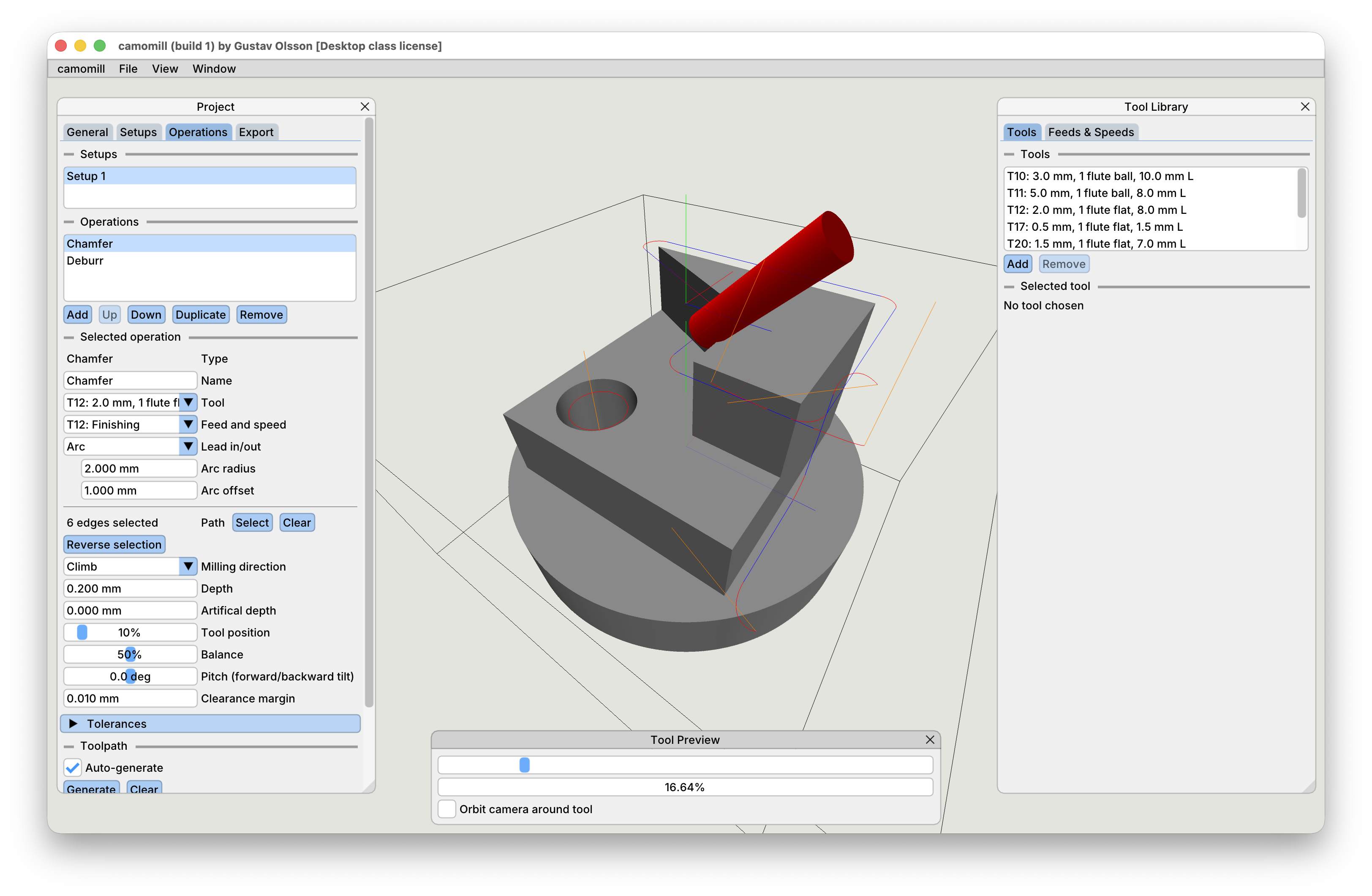
The application lets you import a 3d model file (in the STL file format) from your CAD software, create setups matching your machining setups, add multiple operations to each setups, instantly preview the generated toolpaths (with interactive editing) and export the GCode quickly and easily. The current project is saved between sessions.
A persistent tool library lets you manage your tool collection between projects. The application differentiates between tool geometry and feeds & speeds and a single tool can have multiple feeds & speeds definitions connected to it, for example to allow for different feeds & speeds for different materials. Depth-of-cut and width-of-cut can be specified in the feeds & speeds section and are respected by all operations.
| At this time, the application is focused on chamfer and deburring finishing operations, but more types of operations will be added in the future. The price will be increased as the tool is updated with more features. |
Available operations
* Chamfer (5-axis): Cut any number of edges at a configurable angle with a flat endmill
* Deburr (5-axis): Deburr any number of edges using a ball endmill. Configurable tool roll/pitch (which will be automatically computed to avoid collisions in future releases).
* Pause: Pause the machine and wait for the user to resume the program. Optionally move the machine without running the spindle to setup zero to load material.
* Cut-off: A spiral toolpath that can be used to cut-off a finished part
Currently supported machines
Desktop class:
* PocketNC v2-10 and v2-50 by Penta Machine Company
Industrial class: None at the moment
Note: The tool only supports the PocketNC at this time. See below for how to support your machine.
Pricing / licensing terms
If you buy camomill from this page, you'll be granted a perpetual license to the software in its current state and access to any minor and medium-sized future updates for desktop class CNC machines.
If you intend to use camomill to generate toolpaths for any CNC machine that is NOT part of the desktop class list under "Currently supported machines" above, you will need a special "industry" license of the program. Please contact me for a quote and/or help with supporting your particular machine.
Mouse/keyboard controls
In general:
Left mouse button: Interact with UI
Right mouse button: Rotate the camera
Mouse scroll wheel: Zoom in/out the camera
When editing a selection:
Left mouse button: Select/deselect already selected edges
Middle mouse button: Click to reverse the direction of a selected edge (influences tool orientation together with the mill direction setting)
Left Shift: Hold to disable auto-selection of edge chains
In a future release these controls will be shown within the application itself.
Development log
- First post-release update (Build 2)23 hours ago